
Bisecting
git bisect is an indispensable tool when you need to figure out which commit introduced a breaking change. The bisect command does a binary search through your commit history to help you find the breaking change as quickly as possible. It's also the tool that makes the case for small, self-contained commits better than any style guide: when you've narrowed a bug down to one commit, you want that commit to be about one thing.
Here's a repository with a script, calculate.sh, and a test that checks it. Somewhere in the last dozen commits, the script broke.
$ git log --oneline9881359 Change 12bc716fa Change 11b26f8bb Change 107565bc1 Change 92a39a02 Change 8a96a8c1 Change 725f24b5 Change 60920edc Change 530f093d Change 4517b32f Change 397a922f Change 21c2025c Change 1c4fa71b Add calculator$ ./test.sh
The test fails silently (it exits non-zero, which is all we need). We know it passed at v1.0, the tag on the first commit. To get started, run git bisect start, tell Git that the commit you're currently on is broken with git bisect bad, and give it a commit that you know is working with git bisect good <commit>.
$ git bisect startstatus: waiting for both good and bad commits$ git bisect badstatus: waiting for good commit(s), bad commit known$ git bisect good v1.0Bisecting: 5 revisions left to test after this (roughly 3 steps)[25f24b58658b821401b13c0a7bf08542c16428ac] Change 6
Git has checked out a commit in the middle of the range (detaching HEAD to do so, as we learned in References) and asks you to test it. If the commit is broken, run git bisect bad. If the commit is fine, run git bisect good. Each answer halves the range.
$ ./test.sh$ git bisect goodBisecting: 2 revisions left to test after this (roughly 2 steps)[7565bc1c36327aa6b68721453e0147a5a896ef67] Change 9$ ./test.sh$ git bisect badBisecting: 0 revisions left to test after this (roughly 1 step)[2a39a027c597b2b611d47555d52af5948d01803c] Change 8$ ./test.sh$ git bisect badBisecting: 0 revisions left to test after this (roughly 0 steps)[a96a8c1b74d5b322273ccc16af9b8f0346ba3c6c] Change 7
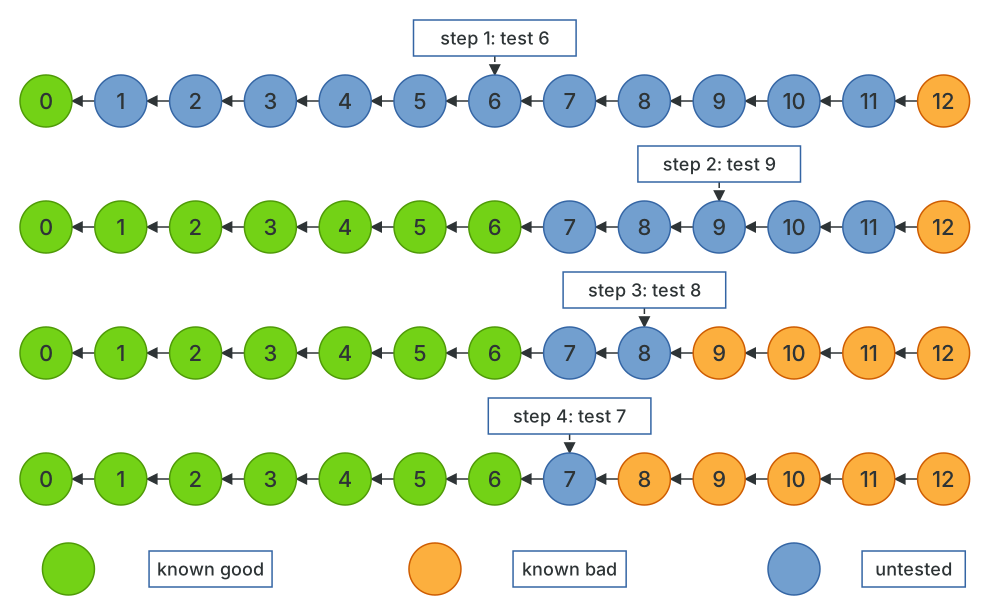
Three steps for twelve commits. The binary search means that a thousand commits take about ten steps, which is what makes bisecting practical on real histories. Once the bisect is finished (or when you want to abort it), be sure to run git bisect reset to return HEAD to where it was before you started.
$ git bisect resetPrevious HEAD position was a96a8c1 Change 7Switched to branch 'main'
Automating it
Answering good or bad by hand is fine for three steps. For ten, or when each test takes a while, git bisect run will do it for you. Give it a command that exits with 0 for good and anything from 1 to 127 (except 125) for bad, and Git runs the whole search.
$ git bisect start HEAD v1.0Bisecting: 5 revisions left to test after this (roughly 3 steps)[25f24b58658b821401b13c0a7bf08542c16428ac] Change 6$ git bisect run ./test.shrunning './test.sh'Bisecting: 2 revisions left to test after this (roughly 2 steps)[7565bc1c36327aa6b68721453e0147a5a896ef67] Change 9running './test.sh'Bisecting: 0 revisions left to test after this (roughly 1 step)[2a39a027c597b2b611d47555d52af5948d01803c] Change 8running './test.sh'Bisecting: 0 revisions left to test after this (roughly 0 steps)[a96a8c1b74d5b322273ccc16af9b8f0346ba3c6c] Change 7running './test.sh'a96a8c1b74d5b322273ccc16af9b8f0346ba3c6c is the first bad commitcommit a96a8c1b74d5b322273ccc16af9b8f0346ba3c6cAuthor: Joseph Wynn <[email protected]>Date: Fri May 29 09:41:40 2026 +1200Change 7calculate.sh | 2 +-notes.txt | 1 +2 files changed, 2 insertions(+), 1 deletion(-)bisect found first bad commit$ git bisect resetPrevious HEAD position was a96a8c1 Change 7Switched to branch 'main'
A few things make bisect run more useful than it first appears. Exit code 125 means "can't test this commit, skip it", which is what you want when a commit in the middle of the range doesn't compile. The script can be anything: npm test, a curl against a dev server, or a one-liner like sh -c 'make && ./a.out | grep -q expected'. And because the test script is usually something you write after the bug appeared, it often isn't in the history at all; keep it outside the repository, or check it in on a branch and refer to it by absolute path, so that Git checking out old commits doesn't make it disappear.
If the bad commit turns out to be a huge merge, git bisect can go looking inside it: bisecting with --first-parent treats each merge as a single step, which is often the right granularity on a branch like main, and once you know which merge is at fault you can bisect again between its two parents.