
Cherry-picking
Rebasing is without a doubt one of Git's most misunderstood features. For most people, git rebase is a command that should be avoided at all costs. This is probably due to the extraordinary amount of scaremongering around rebasing. "Rebase Considered Harmful" and "Please, stay away from rebase" are just two of the many anti-rebase articles you will find in the vast archives of the Internet.
But rebase isn't scary, or dangerous, so long as you understand what it does. And it's much easier to explain rebasing in the context of cherry-picking, so that's where we'll start.
What git cherry-pick does is take one or more commits, and replay them on top of the current commit. Imagine a repository with the following history graph. main has commits E and F that foo doesn't have, and foo has C and D.
$ git log --oneline --graph --all* b2b753d F* c93e268 E| * c4e0a19 D| * eea3291 C|/* 65272ab B* 837e2ce A
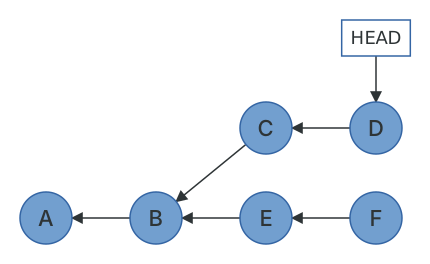
If you are on commit D and you run git cherry-pick F, Git will take the changes that were introduced in commit F and replay them as a new commit (shown as F') on top of commit D.
$ git cherry-pick b2b753d[detached HEAD 9c015c8] FDate: Fri May 29 08:55:40 2026 +12001 file changed, 1 insertion(+)create mode 100644 F.txt$ git log --oneline --graph --all* 9c015c8 F* c4e0a19 D* eea3291 C| * b2b753d F| * c93e268 E|/* 65272ab B* 837e2ce A
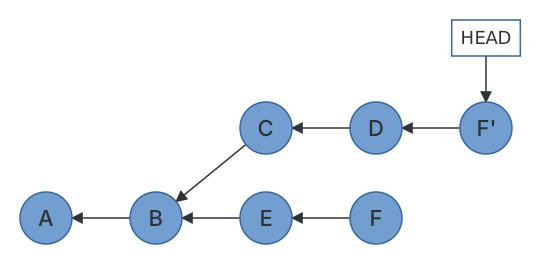
The reason you end up with a copy of commit F rather than commit F itself is due to the way commits are constructed. Recall that the parent commit is part of a commit's content, and therefore part of its hash. So despite containing the exact same changes, author information and timestamp, F' has a different parent to F, giving it a different hash. Comparing the two objects makes this clear.
$ git show --format=raw -s b2b753dcommit b2b753daafd36a922fe20bbb33f61640deb0414ftree 49a746f8de9f39f5c84172596f3b79bd810a5698parent c93e26860c51e8cf1634f6dacfd3040cb1959229author Joseph Wynn <[email protected]> 1780001740 +1200committer Joseph Wynn <[email protected]> 1780001740 +1200F$ git show --format=raw -s HEADcommit 9c015c8764b5bde6f86f7cf72cc34b47096ab6fftree 2c8758bcdc11074f11324697f6f4c94deec7e862parent c4e0a193e18c0f6cd71bb4f10296d15fa56e3c9dauthor Joseph Wynn <[email protected]> 1780001740 +1200committer Joseph Wynn <[email protected]> 1780001740 +1200F
The author and the author date are preserved exactly. The parent is different, the tree is different (because it's D's tree plus F's changes, rather than E's tree plus F's changes), and the committer date is when the cherry-pick happened. This is what "a copy of a commit" means in Git: same change, same author, new parent, new hash.
Notice that "the changes introduced in F" is, once again, something Git computes rather than stores. A cherry-pick is really a three-way merge, exactly like the one in the previous chapter, with F's parent as the merge base, F as "theirs", and your current commit as "ours". This is also why cherry-picks can have conflicts, and why they're resolved the same way (git add the file, then git cherry-pick --continue).
Rebasing by hand
A common workflow in Git is to develop features on small branches, and merge the features one at a time into the main branch. Let's recreate this scenario by adding some branch labels to the graphs.
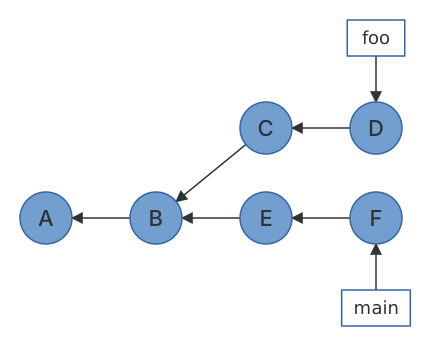
As you can see, main has been updated since foo was created. To avoid potential conflicts when foo is merged with main, we want to bring main's changes into foo. Because main is the base branch, we want to play foo's commits on top of main. Essentially, we want to change commit C's parent from B to F.
We know we can't change C's parent, because that would change C's hash. But we can make copies, and we have a command for that. First, we need to create a temporary branch at commit F.
$ git switch mainSwitched to branch 'main'$ git switch -c foo-tmpSwitched to a new branch 'foo-tmp'
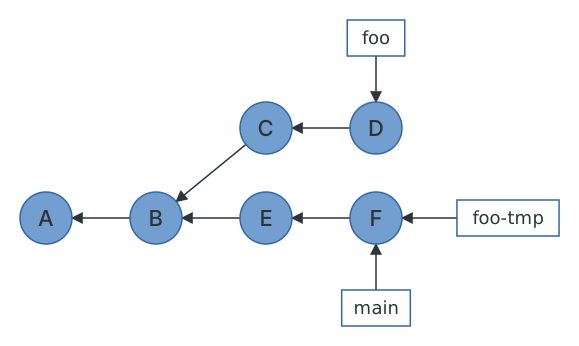
Now that we have a base on commit F, we can cherry-pick all of foo's commits on top of it.
$ git cherry-pick eea3291 c4e0a19[foo-tmp f7aa620] CDate: Fri May 29 08:52:40 2026 +12001 file changed, 1 insertion(+)create mode 100644 C.txt[foo-tmp f2274d1] DDate: Fri May 29 08:53:40 2026 +12001 file changed, 1 insertion(+)create mode 100644 D.txt
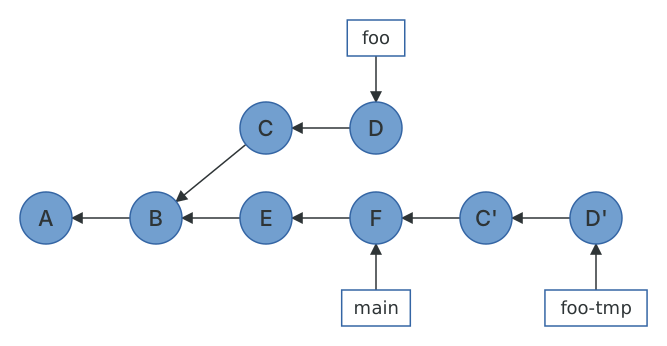
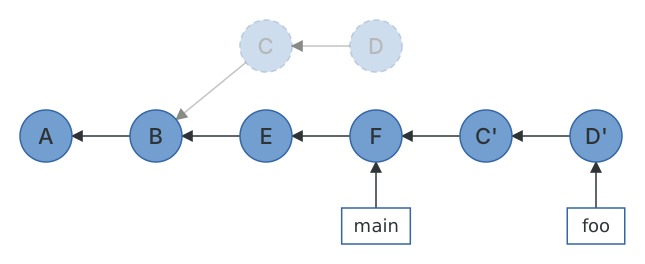
Now all that's left to do is point foo at commit D', and delete the temporary branch foo-tmp. We do this with the reset command, which points HEAD (and therefore the current branch) at a specified commit. The --hard flag ensures our index and working tree are updated as well.
$ git switch fooSwitched to branch 'foo'$ git reset --hard foo-tmpHEAD is now at f2274d1 D$ git branch -D foo-tmpDeleted branch foo-tmp (was f2274d1).$ git log --oneline --graph --all* f2274d1 D* f7aa620 C* b2b753d F* c93e268 E* 65272ab B* 837e2ce A
This gives the desired result of foo's commits being upstream of main. Note that the original C and D commits are no longer reachable because no branch points to them. They still exist in the repository, and git log --all has stopped showing them for exactly that reason.
That was a lot of typing. In the next chapter we'll do it in one command, and it will be obvious why it's safe.