
Commits
A commit object is essentially a pointer that contains a few pieces of important metadata. The commit itself has a hash, which is built from a combination of the metadata that it contains:
- The hash of the tree (the root tree object) at the time of the commit. As we learned in Tree objects, this means that with a single commit, Git can build the entire working tree by recursing into the tree.
- The hash of any parent commits. This is what gives a repository its history: every commit has a parent commit, all the way back to the very first commit.
- The author's name and email address, and the time that the changes were authored.
- The committer's name and email address, and the time that the commit was made.
- The commit message.
Let's see a commit object in action by creating a simple repository.
$ git initInitialized empty Git repository in /home/demo/simple-repository/.git/$ echo 'This is the readme.' > README$ git add README$ git commit -m "First commit"[main (root-commit) 39f6ea2] First commit1 file changed, 1 insertion(+)create mode 100644 README
When you create a commit, Git will give you the (abbreviated) hash of that commit. A commit is an object like any other, so we can look at it with cat-file.
$ git cat-file -t HEADcommit$ git cat-file -p HEADtree 9d073fcdfaf07a39631ef94bcb3b8268bc2106b1author Joseph Wynn <[email protected]> 1780000060 +1200committer Joseph Wynn <[email protected]> 1780000060 +1200First commit
That's the whole thing. A commit is a few lines of text: a tree hash, an author, a committer, and a message. This commit has no parent line because it is the first commit in the repository (Git calls this a root commit). The tree, 9d073fc, is a tree object exactly like the ones from the previous chapter, and if you inspect it you'll find the README blob from Objects.
The dates are Unix timestamps with a timezone offset. The reason there are two of them (and two names) is that the person who authored a change isn't always the person who committed it. If somebody emails you a patch and you apply it, they are the author and you are the committer. As we'll see in Cherry-picking and Rebasing, Git also preserves the original author when it copies a commit, while recording you as the committer of the copy.
git show with the --format=raw flag shows the same information along with the diff that the commit introduced.
$ git show --format=rawcommit 39f6ea2439eb1fd9f7837a223866f243b70125c0tree 9d073fcdfaf07a39631ef94bcb3b8268bc2106b1author Joseph Wynn <[email protected]> 1780000060 +1200committer Joseph Wynn <[email protected]> 1780000060 +1200First commitdiff --git a/README b/READMEnew file mode 100644index 0000000..9761654--- /dev/null+++ b/README@@ -0,0 +1 @@+This is the readme.
It's worth pausing on that diff. The commit object doesn't contain it. Git computed it on the fly by comparing the commit's tree with the tree of its parent (or, for a root commit, with an empty tree). Commits are snapshots; diffs are derived. This is the opposite of how most people imagine version control working, and it's the reason so many Git operations that sound expensive (comparing arbitrary commits, switching branches, checking whether a file has changed) are fast.
Commits, trees and blobs together
Putting the last three chapters together, here is what the repository looks like after a second commit that changes the readme.
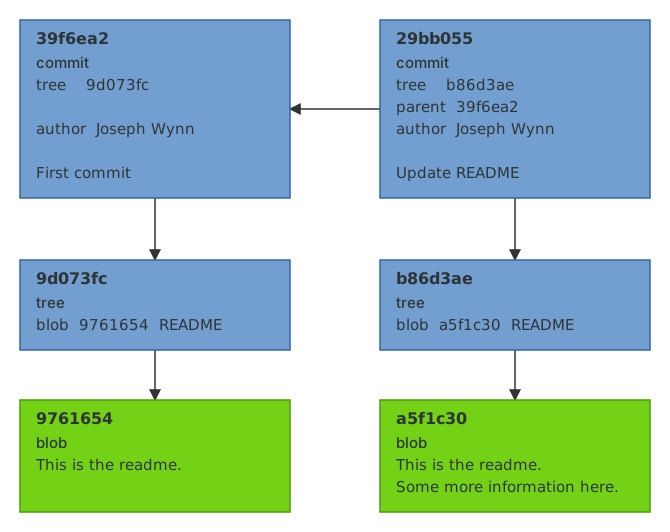
Every arrow in this diagram is a hash embedded in an object. The second commit contains the hash of the first commit, which contains the hash of a tree, which contains the hash of a blob. Change any object anywhere in this graph and every hash "downstream" of it changes too. Cryptographers call this a Merkle tree, and it is what lets Git verify the integrity of an entire history by checking a single hash.
Abbreviated hashes
Notice how although we referenced the commit by the partial hash 39f6ea2 in the git commit output, Git was able to figure out that we actually meant 39f6ea2439eb1fd9f7837a223866f243b70125c0. This is because the hashes that Git assigns to objects are unique enough to be identified by the first few characters. You can see here that Git is able to find this commit with as few as four characters; Git refuses to go any shorter than that.
$ git show --oneline -s 39f639f6ea2 First commit$ git show --oneline -s 39ffatal: ambiguous argument '39f': unknown revision or path not in the working tree.
git rev-parse --short will give you an abbreviation that Git guarantees is unique in your repository right now. Seven characters is the minimum, but in large repositories Git will automatically use more (the Linux kernel needs twelve). Bear this in mind before you paste a seven-character hash into a commit message or a bug tracker: it's unique today, but it might not be forever.
$ git rev-parse --short HEAD39f6ea2
We now know what Git stores. Next we need to look at the part of Git that sits between your files and your commits, and which most guides skip entirely.