
Fetching
The git fetch command is fairly simple. It takes the name of a remote (unless used with the --all flag, which fetches all remotes), and retrieves any new references and all objects necessary to complete them. It never touches your branches, your index or your working tree, which makes it the safest command in Git and the one you should reach for when you want to know what's happening on a remote without committing to anything.
To understand what it does with those references, we need to talk about remote-tracking branches.
Remote-tracking branches
Recall what a remote's configuration looks like.
$ git config get remote.origin.fetch+refs/heads/*:refs/remotes/origin/*
This is a refspec. It has the form <source>:<destination>, and this one says that the references found in origin's refs/heads/* should be stored locally in refs/remotes/origin/*. (The leading + means "even if it isn't a fast-forward", which is appropriate for a copy of somebody else's branch.) We can see the result in the repository that we cloned earlier.
$ ls -l .git/refs/remotes/origin/total 24-rw-r--r-- 1 demo demo 30 Sep 29 00:32 HEAD-rw-r--r-- 1 demo demo 41 Sep 29 00:32 feature-branch-rw-r--r-- 1 demo demo 41 Sep 29 00:32 main
These are remote-tracking branches. origin/main is an ordinary reference to an ordinary commit; the only thing special about it is that Git updates it for you whenever you fetch, and won't let you commit to it directly. It's your repository's memory of where origin's main was the last time you looked.
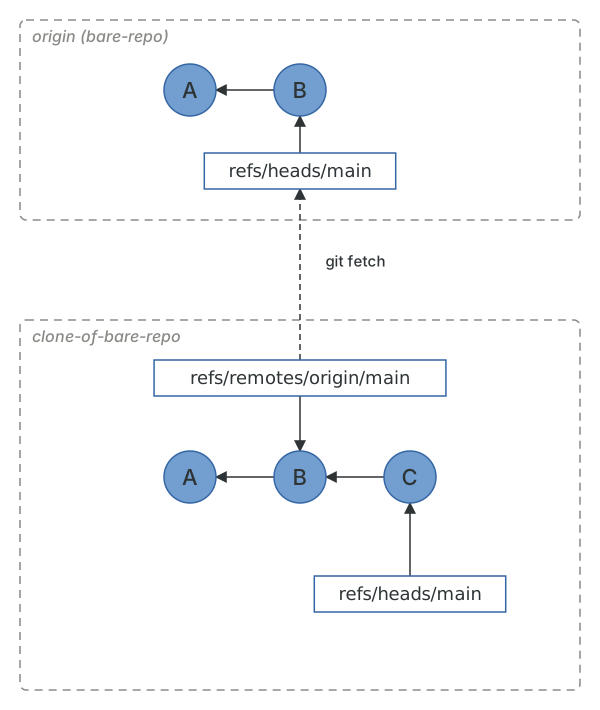
Let's see a fetch in action to get a better idea of what happens. First, we'll create a new branch on the remote repository.
$ git -C ../bare-repo branch experiment main
Now we'll run git fetch from the clone.
$ git fetch originFrom /home/demo/bare-repo* [new branch] experiment -> origin/experiment
This has done a couple of things. First, it has created a reference for the remote branch in .git/refs/remotes/origin.
$ cat .git/refs/remotes/origin/experiment9b446ebb6b83276777caa37a34446473283fa57a
It has also updated a special file, .git/FETCH_HEAD, with some important information. We'll talk about this file in more detail in Pulling.
$ cat .git/FETCH_HEAD76112504b5b1fd48bc126babab4efd554731ffe8 branch 'feature-branch' of /home/demo/bare-repo9b446ebb6b83276777caa37a34446473283fa57a not-for-merge branch 'experiment' of /home/demo/bare-repo9b446ebb6b83276777caa37a34446473283fa57a not-for-merge branch 'main' of /home/demo/bare-repo
What it hasn't done is created a local branch. This is because Git understands that even though the remote has an experiment branch, you might not want it in your local repository.
$ git branch* feature-branchmain$ git branch -rorigin/HEAD -> origin/mainorigin/experimentorigin/feature-branchorigin/main
(That origin/HEAD entry is a symbolic ref, like your own HEAD, recording which branch the remote considers its default. git remote set-head origin --auto updates it if the remote's default branch changes.)
But what if we do want a local branch which tracks the remote experiment? Git makes this easy. If we run git switch experiment, rather than failing because no local experiment exists, Git will see that there is exactly one remote with an experiment branch and create a local branch for us.
$ git switch experimentSwitched to a new branch 'experiment'branch 'experiment' set up to track 'origin/experiment'.
Git has done a couple of things for us here. First, it has created a local experiment reference which points to the same commit as the remote experiment. It has also written the tracking configuration into .git/config, so git push and git pull know which remote branch this local branch corresponds to.
$ git branch -vv* experiment 9b446eb [origin/experiment] Add readmefeature-branch 7611250 [origin/feature-branch] Update README from the second clonemain 9b446eb [origin/main] Add readme$ git config get --show-names --regexp '^branch\.experiment'branch.experiment.merge refs/heads/experiment
git branch -vv is the quickest way to see every local branch alongside its upstream, and after a fetch it will also show you how many commits ahead or behind each one is. The upstream has a name in Git's revision syntax, @{upstream} (or @{u}), which is handy in commands like git log @{u}.. ("what have I committed that isn't pushed yet?").
$ git rev-parse --abbrev-ref @{upstream}origin/experiment
Pruning
When a branch is deleted on the remote, your remote-tracking branch for it doesn't go anywhere. git fetch only adds and updates refs.
$ git -C ../bare-repo branch -d experimentDeleted branch experiment (was 9b446eb).$ git fetch origin$ git branch -rorigin/HEAD -> origin/mainorigin/experimentorigin/feature-branchorigin/main
--prune tells Git to also delete any remote-tracking branches that no longer exist on the remote.
$ git fetch --prune originFrom /home/demo/bare-repo- [deleted] (none) -> origin/experiment$ git branch -rorigin/HEAD -> origin/mainorigin/feature-branchorigin/main
I'd recommend setting fetch.prune = true globally so that this always happens. A repository that's been around for a few years without it will have hundreds of origin/ branches that mean nothing. Note that pruning only removes remote-tracking branches; your local experiment branch is yours, and Git won't delete it.
Shallow and partial clones
Everything we've done so far has fetched complete histories. For most repositories that's fine, but there are repositories with millions of commits and gigabytes of history where a full clone takes hours. Git has two ways to fetch less.
A shallow clone truncates history. --depth 1 fetches only the tip commit of each branch and records, in .git/shallow, that those commits' parents are deliberately missing.
$ git clone --depth 1 file:///home/demo/bare-repo shallow-cloneCloning into 'shallow-clone'...$ cat shallow-clone/.git/shallow9b446ebb6b83276777caa37a34446473283fa57a$ git -C shallow-clone log --oneline9b446eb Add readme
Shallow clones are perfect for CI, where you only need the current tree, and awkward for anything else: git log, git blame and git bisect all stop at the shallow boundary. git fetch --unshallow will fill in the rest.
A partial clone keeps the full history but leaves out the contents. --filter=blob:none fetches every commit and tree, but no blobs, so you can still see the full log and diff-stat of every commit. Git records the filter in the remote's configuration and marks the remote as a promisor: a remote that has promised to hand over any missing object on request.
$ git clone --filter=blob:none file:///home/demo/bare-repo partial-cloneCloning into 'partial-clone'...$ git -C partial-clone config get --show-names remote.origin.partialclonefilterremote.origin.partialclonefilter blob:none
When Git needs a blob it doesn't have (to check out a branch, say, or to show a diff), it fetches it from the promisor remote on demand. For a giant monorepo this turns a multi-gigabyte clone into a few hundred megabytes, with the full history intact. GitHub and most other hosts support it, and if you work on a repository that makes you wait for clones, it's the first thing to try.