
Pulling
The git pull command is, like git clone, a nice shortcut which essentially just runs a few lower-level commands. In short, with the format git pull <remote> <branch>, the git pull command does the following:
- Runs
git fetch <remote> <branch>. - Reads
.git/FETCH_HEADto figure out which fetched branch should be merged. - Runs
git merge(or, as we'll see,git rebase) to bring it into the current branch.
At this point, it helps to understand Git's FETCH_HEAD. Every time you run git fetch, Git stores information about the fetched branches in .git/FETCH_HEAD. This is referred to as a short-lived reference, because Git overwrites it every time you run git fetch.
Let's introduce some new commits to our remote repository so that we can see this in practice. In a second clone of the same repository, we commit and push to main.
$ echo 'Some more information.' >> README$ git commit -am "Add more information to readme"[main 17e34fd] Add more information to readme1 file changed, 1 insertion(+)$ git push origin mainTo /home/demo/bare-repo/9b446eb..17e34fd main -> main
Now, using the steps outlined earlier, let's manually perform a git pull on the original clone to pull in the changes we just introduced.
$ git fetch originFrom /home/demo/bare-repo9b446eb..17e34fd main -> origin/main$ cat .git/FETCH_HEAD17e34fd3e777c5ee7bc8a1aacf7a04d6fd240341 branch 'main' of /home/demo/bare-repo76112504b5b1fd48bc126babab4efd554731ffe8 not-for-merge branch 'feature-branch' of /home/demo/bare-repo
At this point, Git has updated our local copy of the remote branch, and updated the information in FETCH_HEAD. The line for main isn't marked not-for-merge because main is the current branch's upstream. Our local main hasn't moved.
$ cat .git/refs/heads/main9b446ebb6b83276777caa37a34446473283fa57a$ cat .git/refs/remotes/origin/main17e34fd3e777c5ee7bc8a1aacf7a04d6fd240341
We know from FETCH_HEAD that the fetch introduced some changes to main. So all that's left to do to complete the "pull" is perform a merge.
$ git merge FETCH_HEADUpdating 9b446eb..17e34fdFast-forwardREADME | 1 +1 file changed, 1 insertion(+)
And that's it: we've just performed a git pull without actually running git pull. (We could equally have merged origin/main; it points at the same commit.) Of course, it is much easier to let Git take care of these details. Just to be sure that the outcome is the same, we can undo the merge and run git pull as well.
$ git reset --hard HEAD~1HEAD is now at 9b446eb Add readme$ git pull origin mainFrom /home/demo/bare-repo* branch main -> FETCH_HEADUpdating 9b446eb..17e34fdFast-forwardREADME | 1 +1 file changed, 1 insertion(+)
Divergent branches
That was the easy case: we hadn't committed anything locally, so the merge was a fast-forward. Let's make it harder. We'll reset again, make a local commit, and then pull.
$ git reset --hard HEAD~1HEAD is now at 9b446eb Add readme$ echo 'A local change.' > LOCAL$ git add LOCAL$ git commit -m "Add a local file"[main ee4b1d9] Add a local file1 file changed, 1 insertion(+)create mode 100644 LOCAL$ git log --oneline --graph --all* ee4b1d9 Add a local file| * 17e34fd Add more information to readme|/* 9b446eb Add readme
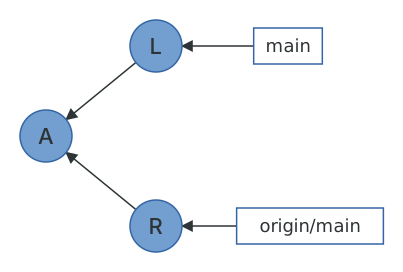
Our main and origin/main have diverged: each has a commit the other doesn't. Since Git 2.27, git pull refuses to guess what you want in this situation.
$ git pullhint: You have divergent branches and need to specify how to reconcile them.hint: You can do so by running one of the following commands sometime beforehint: your next pull:hint:hint: git config pull.rebase false # mergehint: git config pull.rebase true # rebasehint: git config pull.ff only # fast-forward onlyhint:hint: You can replace "git config" with "git config --global" to set a defaulthint: preference for all repositories. You can also pass --rebase, --no-rebase,hint: or --ff-only on the command line to override the configured default perhint: invocation.fatal: Need to specify how to reconcile divergent branches.
You now know enough to understand all three options. Merging creates a merge commit with your commit and theirs as parents, which is what older versions of Git did silently, and which is responsible for all those "Merge branch 'main' of github.com:..." commits littering histories everywhere.
$ git pull --no-rebaseMerge made by the 'ort' strategy.README | 1 +1 file changed, 1 insertion(+)$ git log --oneline --graph* 6d2a996 Merge branch 'main' of /home/demo/bare-repo|\| * 17e34fd Add more information to readme* | ee4b1d9 Add a local file|/* 9b446eb Add readme
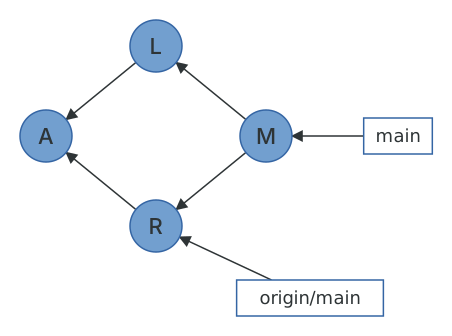
Rebasing replays your local commits on top of the fetched ones, giving a linear history. Since the commits being rebased are yours and unpushed, this is exactly the situation where rebasing is safe.
$ git reset --hard HEAD^1HEAD is now at ee4b1d9 Add a local file$ git pull --rebaseSuccessfully rebased and updated refs/heads/main.$ git log --oneline --graph* 3b80b8d Add a local file* 17e34fd Add more information to readme* 9b446eb Add readme
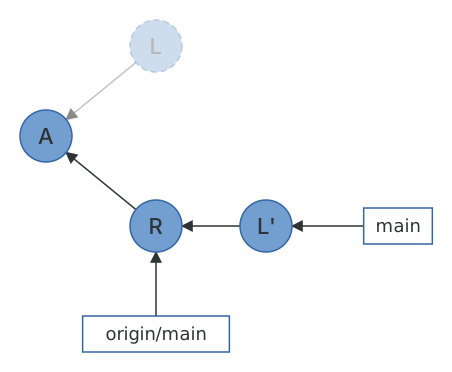
And --ff-only refuses to do either, leaving you to sort it out by hand. This is my recommendation for a global default (pull.ff = only): git pull then either does the obviously-safe thing or stops, and when it stops you can decide between git pull --rebase and git merge with your eyes open. What you should not do is set pull.rebase = false to make the hint go away, which is the option that produces the merge commits nobody wants.
We've now been through every command that moves commits between repositories, and it turns out there were only two: fetch sends refs and objects one way, push sends them the other, and clone and pull are conveniences built on top. Next, let's look at a few tools that are much less confusing once you know how the pieces fit together.