
Merging
Merging in Git is the process of joining two histories (usually branches) together. Let's start with a simple example. Say you've created a new feature branch from main, and done some work on it.
$ git switch -c feature-branchSwitched to a new branch 'feature-branch'$ echo '<p>Our shiny new feature.</p>' > feature.html$ git add feature.html$ git commit -m "Finished the new feature"[feature-branch ed549eb] Finished the new feature1 file changed, 1 insertion(+)create mode 100644 feature.html
At the same time, you need to fix an urgent bug. So you create a hotfix branch from main, and do some work in there.
$ git switch mainSwitched to branch 'main'$ git switch -c hotfixSwitched to a new branch 'hotfix'$ vim index.html$ git commit -am "Fixed some wording"[hotfix 4b1c5ad] Fixed some wording1 file changed, 1 insertion(+), 1 deletion(-)
At this point, the history looks like this. In the diagrams, A is the initial commit, B is the feature and C is the hotfix.
$ git log --oneline --graph --all* 4b1c5ad Fixed some wording| * ed549eb Finished the new feature|/* fa2639d Initial commit
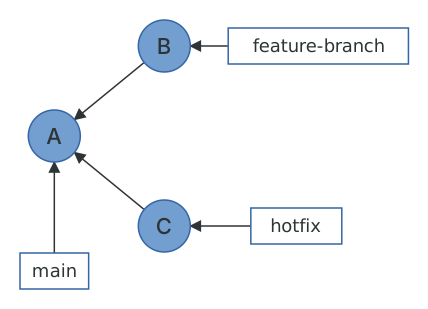
Now you want to bring the bug fix into main so that you can tag it and release it.
$ git switch mainSwitched to branch 'main'$ git merge hotfixUpdating fa2639d..4b1c5adFast-forwardindex.html | 2 +-1 file changed, 1 insertion(+), 1 deletion(-)
Notice how Git mentions fast-forward during the merge. What this means is that all of the commits in hotfix were directly upstream from main. This allows Git to simply move the main pointer up the tree to hotfix. No new commit was created; a fast-forward merge is nothing more than a ref update. What you end up with looks like this.
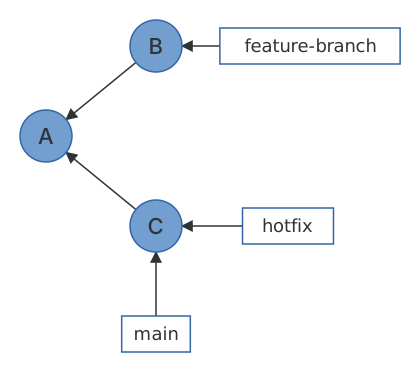
Now let's try and merge feature-branch into main.
$ git merge feature-branchMerge made by the 'ort' strategy.feature.html | 1 +1 file changed, 1 insertion(+)create mode 100644 feature.html
This time, Git wasn't able to perform a fast-forward. This is because feature-branch isn't directly upstream from main: main is at C, and C is not an ancestor of B. So how did Git handle this merge? Taking a look at the log, we see that Git has actually created a new "merge" commit, as well as bringing in the commit from feature-branch.
$ git log --oneline --graph* 418b8e9 Merge branch 'feature-branch'|\| * ed549eb Finished the new feature* | 4b1c5ad Fixed some wording|/* fa2639d Initial commit
Upon closer inspection, we can see that this is a special kind of commit object: it has two parent commits. This is referred to as a merge commit.
$ git show --format=raw -s HEADcommit 418b8e931a239f340c6b9b32d0e7c46146f9fcb2tree 23849eeb143a6e68e7f1ad2a4d6b10e9cfdd8fb7parent 4b1c5adde3cb2bd0f90a5023d5d078df2b9ef0c5parent ed549eb88300c3536957138f9d0879fd78a86ce7author Joseph Wynn <[email protected]> 1780000840 +1200committer Joseph Wynn <[email protected]> 1780000840 +1200Merge branch 'feature-branch'
This means that our history graph now looks something like this (commit D is the new merge commit).
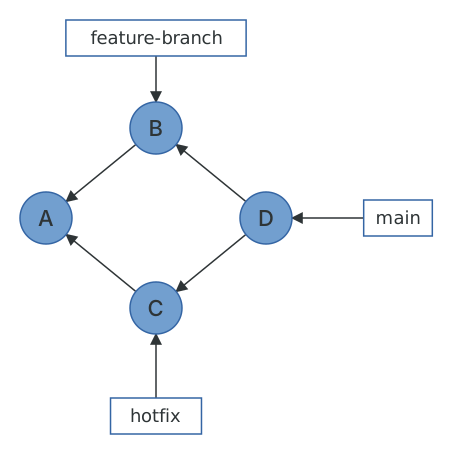
The order of the parents matters. The first parent is always the commit you were on when you ran git merge, and the second is the one you merged in. git log --first-parent follows only the first parents, which on a branch like main gives you a tidy list of merges without any of the commits inside them.
How a merge is computed
The word ort in the output above is the name of Git's merge strategy. It replaced the older recursive strategy in Git 2.34, and while it's much faster and better at renames, the underlying idea is the same and it's worth understanding, because it's the reason merge conflicts look the way they do.
A merge is a three-way operation. Git finds the merge base: the most recent commit that both branches have in common. You can ask for it directly.
$ git merge-base main feature-branchfa2639df488ccc2f283ec5761b871e0dd35617b9
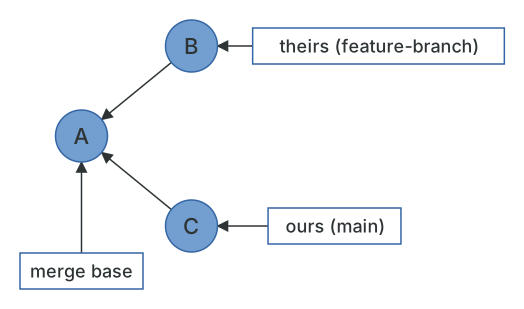
Git then compares the tree on each side with the tree of the merge base. For each file, there are only a few possibilities. If only one side changed it, take that side's version. If both sides changed it identically, take either. If neither changed it, keep it. And if both sides changed it differently, Git tries to combine the changes line by line, and if the same lines were touched on both sides, that's a conflict. The result is a new tree, and the merge commit points at that tree and at both parents.
This is also why it's a three-way merge and not a two-way one. Without the base, Git couldn't tell whether a line that differs between the branches was added on one side or removed on the other.
Conflicts
Let's engineer a conflict. We'll make a branch off the initial commit that changes the heading of index.html, and change the same heading on main.
$ git log --oneline --graph --all* c18e776 Be more friendly* 418b8e9 Merge branch 'feature-branch'|\| * ed549eb Finished the new feature* | 4b1c5ad Fixed some wording|/| * 2696c86 Add some excitement|/* fa2639d Initial commit$ git merge conflicting-branchAuto-merging index.htmlCONFLICT (content): Merge conflict in index.htmlAutomatic merge failed; fix conflicts and then commit the result.
Git has stopped halfway through. It has written everything it could merge into the index and the working tree, and left the conflicting file with markers showing both versions.
$ git statusOn branch mainYou have unmerged paths.(fix conflicts and run "git commit")(use "git merge --abort" to abort the merge)Unmerged paths:(use "git add <file>..." to mark resolution)both modified: index.htmlno changes added to commit (use "git add" and/or "git commit -a")$ cat index.html<<<<<<< HEAD<h1>Welcome, friend</h1><p>This is our web site.</p>=======<h1>Welcome!</h1><p>This is our website.</p>>>>>>>> conflicting-branch
Here's the frustrating thing about the default conflict markers: they show you ours and theirs, but not the base. You can see both sides changed the heading, but you can't see what the heading was to begin with, so you can't tell what each side was trying to do. Given what we know about three-way merges, Git obviously has that information. The zdiff3 conflict style asks it to include it.
$ git merge --abort$ git config set merge.conflictStyle zdiff3$ git merge conflicting-branchAuto-merging index.htmlCONFLICT (content): Merge conflict in index.htmlAutomatic merge failed; fix conflicts and then commit the result.$ cat index.html<<<<<<< HEAD<h1>Welcome, friend</h1><p>This is our web site.</p>||||||| fa2639d<h1>Welcome</h1><p>This is our website.</p>=======<h1>Welcome!</h1><p>This is our website.</p>>>>>>>> conflicting-branch
Now the middle section shows the merge base. It's immediately clear that one side added ", friend" and the other added "!", and that the right resolution is to keep both. I'd recommend setting zdiff3 globally; it is the single most useful piece of Git configuration I know of.
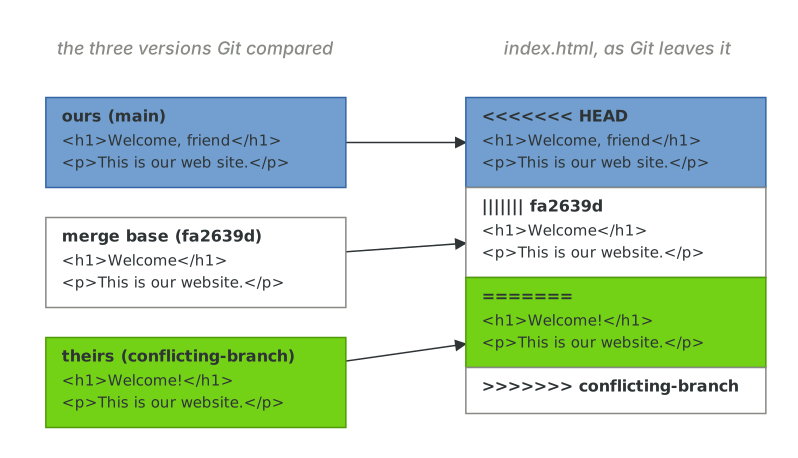
Resolving a conflict means editing the file until it's right, and then adding it. Adding the file is what tells Git the conflict is resolved (it clears the stage numbers we glimpsed in The index), and git merge --continue finishes the job by creating the merge commit.
$ vim index.html$ git add index.html$ git merge --continue[main 6e9d4d5] Merge branch 'conflicting-branch'
If you ever want to know what the merge would have produced without the conflict markers, git diff during a conflict shows a combined diff of the conflicted files against both parents, and git checkout --conflict=zdiff3 index.html will re-create the markers if you've made a mess of resolving them.
Controlling the kind of merge
Git chooses between a fast-forward and a merge commit based on the history. Three flags let you override it.
--ff-only refuses to create a merge commit. It's useful in scripts and as a git pull setting, because it turns "merge" into "either this is trivially safe, or stop and let me look".
$ git merge --ff-only feature-branchAlready up to date.
--no-ff always creates a merge commit, even when a fast-forward was possible. Some teams like this because every feature shows up as a single merge in git log --first-parent, and it can be reverted in one go with git revert -m 1.
$ git merge --no-ff another-hotfixMerge made by the 'ort' strategy.more.html | 1 +1 file changed, 1 insertion(+)create mode 100644 more.html$ git log --oneline --graph -3* a7fb38b Merge branch 'another-hotfix'|\| * 61aedd6 Add more content|/* 6e9d4d5 Merge branch 'conflicting-branch'
--squash does the merge in the index and working tree but doesn't commit, and doesn't record the other branch as a parent. You get a single ordinary commit with all the changes, and the history has no idea a branch was ever involved.
$ git merge --squash another-hotfixUpdating 6e9d4d5..61aedd6Fast-forwardSquash commit -- not updating HEADmore.html | 1 +1 file changed, 1 insertion(+)create mode 100644 more.html$ git status --shortA more.html$ git commit -m "Add more content (squashed)"[main 2bd5018] Add more content (squashed)1 file changed, 1 insertion(+)create mode 100644 more.html
The "Squash and merge" button on GitHub does exactly this. It produces a clean history, at the cost that Git can no longer tell that another-hotfix has been merged, so merging it again (or deleting it with -d) will complain.
Some people believe that merge commits are undesirable and that history should be a straight line. In Rebasing, we'll learn how to prevent non-fast-forward merges by rebasing feature branches before merging them with main. But before we get to that, we need to take a quick digression.