
Objects
I described the repository as a key-value store. Let's be precise about that: the values are objects (blobs, trees, commits and tags), and the keys are the hashes of those objects. Git never asks you to choose a key. It derives the key from the content, which means that the same content always has the same key, in every repository, on every machine.
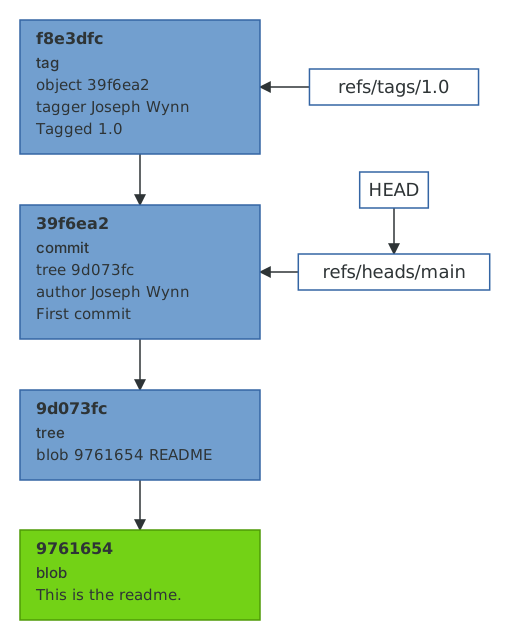
This is easy to demonstrate. Git's hash-object command will tell you the key of a file without storing anything.
$ echo 'This is the readme.' > README$ git hash-object README9761654c68d36874ac2184210502a0d2d116e817
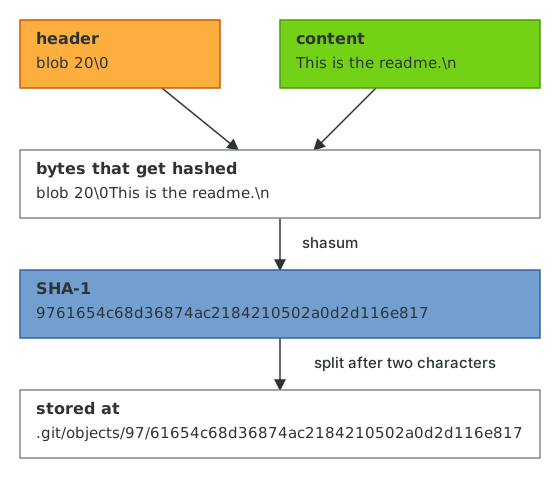
That 40-character hexadecimal string is a SHA-1 hash. It is not simply the hash of the file's contents, though. Git prepends a small header consisting of the object type, a space, the length of the content in bytes, and a NUL byte. We can reproduce it exactly with printf and shasum.
$ printf 'blob 20\0This is the readme.\n' | shasum9761654c68d36874ac2184210502a0d2d116e817 -
This header is the reason a blob, a tree and a commit can never collide even if they contained the same bytes, and it's also why you'll see the word "blob" (binary large object) so often: a blob is just content with a blob header. It doesn't know its own file name, its permissions, or which directory it lives in. Those details belong to tree objects, which we'll get to in the next chapter.
Storing objects
hash-object only computed the hash. Passing the -w flag tells Git to write the object to the repository as well.
$ find .git/objects -type f$ git hash-object -w README9761654c68d36874ac2184210502a0d2d116e817$ find .git/objects -type f.git/objects/97/61654c68d36874ac2184210502a0d2d116e817
The object has been stored in .git/objects in a directory named after the first two characters of the hash, with the remaining 38 characters as the file name. This is called a loose object, and it is exactly what you'd expect a key-value store to look like if you built it out of a file system.
Objects are the lowest-level thing in Git, and there is a low-level command for looking at them: git cat-file. It can tell you an object's type, its size, and pretty-print its contents.
$ git cat-file -t 9761654blob$ git cat-file -s 976165420$ git cat-file -p 9761654This is the readme.
Notice that we only needed the first seven characters of the hash. Git will accept any unambiguous prefix of at least four characters. We'll see more of this in Commits.
If you're curious about what's actually in the file, it's the header and content from earlier, compressed with zlib. Python's standard library can decompress it for us.
$ python3 -c 'import sys, zlib; print(zlib.decompress(sys.stdin.buffer.read()))' \< .git/objects/97/61654c68d36874ac2184210502a0d2d116e817b'blob 20\x00This is the readme.\n'
(Python shows the NUL byte as \x00.) That's the entire storage format for a loose object. There's no database, no index of file names, and nothing you couldn't reimplement in an afternoon. Later on, in Packfiles and garbage collection, we'll see that Git eventually squeezes loose objects together into more efficient pack files, but the objects themselves never change.
Immutability
Because an object's name is the hash of its content, an object can never be modified. If you change a single byte of the readme, you get a different hash, which is a different object, and the old object is left untouched. This one property is behind almost everything that makes Git feel strange at first: why commits can't be edited (only replaced), why rebasing creates "copies" of commits, and why it's so hard to permanently lose anything. Keep it in mind as we go.
SHA-1 and SHA-256
Git was designed around SHA-1, and SHA-1 has been considered cryptographically broken since 2017. In practice Git guards against the known collision attack, and the odds of an accidental collision in a repository are so small as to be irrelevant. Nevertheless, Git can now create repositories that use SHA-256 for object names.
$ git init --object-format=sha256 sha256-repositoryInitialized empty Git repository in /home/demo/sha256-repository/.git/$ echo 'This is the readme.' | git -C sha256-repository hash-object --stdin538145154a17bc939a457c1bd466f1eeae52ba9735729079e581f48c8d9126ce$ cat sha256-repository/.git/config[extensions]objectformat = sha256[core]repositoryformatversion = 1...
Same content, different key: the hashes are now 64 characters long. Everything in this guide works the same way in a SHA-256 repository, only with longer hashes. The catch is that the two formats can't talk to each other yet: a SHA-256 repository can't push to or fetch from a SHA-1 repository, and most hosting providers only support SHA-1. Until that changes, SHA-256 repositories are a curiosity rather than a recommendation, and the rest of this guide will use SHA-1.