
Tree objects
A blob on its own is just content. A tree object is what gives that content a name and a place in a directory. A tree can be thought of as a directory listing: it contains a list of entries, each with a file mode, a type, a hash, and a name. The entries point at blobs (files) and at other tree objects (sub-directories).
Imagine we had a simple repository, with a README file and a src/ directory containing a hello.c file.
$ find . -type f -not -path "./.git/*"./README./src/hello.c
We can ask Git to build tree objects for this directory structure by adding the files to the index (more on that in The index) and then asking Git to write the index out as a tree.
$ git add .$ git write-tree292240e266acb139ea0dd684b6abdee11d909ecf
write-tree gives us the hash of the root tree. Let's look at it with cat-file.
$ git cat-file -p 292240e100644 blob 9761654c68d36874ac2184210502a0d2d116e817 README040000 tree 675bff738deac083f2155cd9902a0bc6251bbd02 src
There's our README blob from the previous chapter, with the same hash. The tree also has an entry for src, which points at another tree. Let's follow it.
$ git cat-file -p 675bff7100644 blob 032e1d150fda502f69806db878e90f41ce02468d hello.c$ git cat-file -p 032e1d1#include <stdio.h>int main() {puts("Hello, world!");}
If we draw the blobs (in green) as well as the tree objects (in blue), we end up with a diagram that looks a lot like our directory structure.
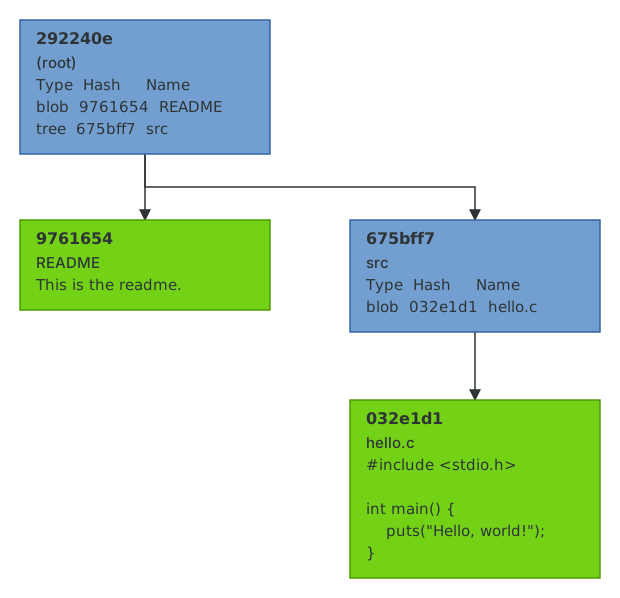
Notice how given the root tree object, we can recurse through every tree object to figure out the state of the entire working tree. The root tree object, therefore, is essentially a snapshot of your repository at a given time. Usually when Git refers to "the tree", it is referring to the root tree object. git ls-tree will do the recursion for us.
$ git ls-tree -r -t 292240e100644 blob 9761654c68d36874ac2184210502a0d2d116e817 README040000 tree 675bff738deac083f2155cd9902a0bc6251bbd02 src100644 blob 032e1d150fda502f69806db878e90f41ce02468d src/hello.c
The numbers at the start of each entry are file modes. Git only records a handful of them: 100644 for a normal file, 100755 for an executable, 120000 for a symbolic link, 040000 for a directory, and 160000 for a submodule. It does not store owners, groups, timestamps or the full permission bits. This is why cloning a repository doesn't preserve file modification times, and why chmod g+w on a file will never show up in git status.
Trees are shared
Because trees are objects, they follow the same rules as blobs: identical content means an identical hash, and objects are never modified. This has a lovely consequence. If you change README and take another snapshot, the new root tree will have a different hash (because its README entry changed), but the new root tree will point at the same src tree as before, because nothing in src changed. Git doesn't need to store a copy of src for every snapshot, and it doesn't need to compute a diff to figure that out; the hashes do the work.
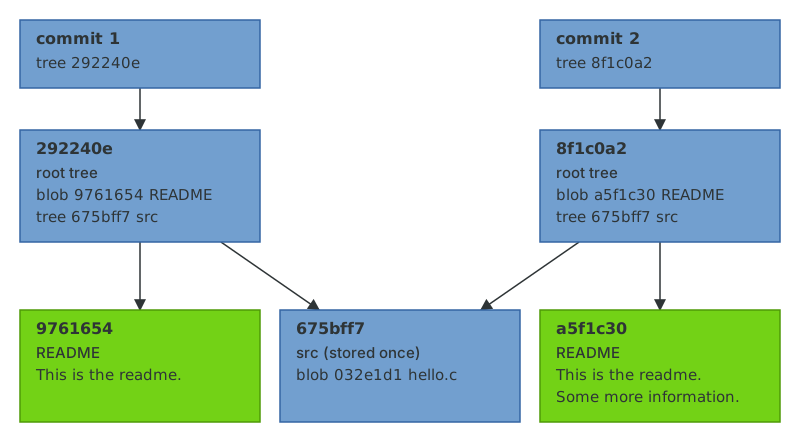
This is what people mean when they say Git stores snapshots rather than differences. Every snapshot is complete, and yet the parts that didn't change are stored exactly once.
Now let's learn how you can track the history of your repository with commit objects.