
Packfiles and garbage collection
Back in Objects we saw that Git stores each object as a zlib-compressed file in .git/objects. That's simple and it's what Git does for every new object, but it wouldn't scale: a repository with a million objects would have a million small files, and since every version of every file is a separate blob, most of those files would be nearly identical to some other file. Git has a second storage format for exactly this reason, and a process that periodically converts one into the other.
The repository from the previous chapter has a handful of loose objects.
$ git count-objects -vcount: 14size: 56in-pack: 0packs: 0size-pack: 0prune-packable: 0garbage: 0size-garbage: 0$ find .git/objects -type f | head -5.git/objects/6a/d170702649192e8a22730df701c669446f3836.git/objects/e5/9893378579d2ea4b0dad5358c98005b073029e.git/objects/e2/43e33f1e78520994238acbbdc71c69fb552562.git/objects/87/8ea3845b42e24ba83174422bbc5a47b2e1b610.git/objects/54/3b9bebdc6bd5c4b22136034a95dd097a57d3dd
git gc is Git's housekeeping command. Git runs it for you automatically every so often (which is what the "Auto packing the repository" message you occasionally see is about), but we can run it by hand.
$ git gc$ git count-objects -vcount: 0size: 0in-pack: 14packs: 2size-pack: 3prune-packable: 0garbage: 0size-garbage: 0$ ls .git/objects/pack/pack-60461f6cea5dc96c492c48a3c51b40fc837741c1.idxpack-60461f6cea5dc96c492c48a3c51b40fc837741c1.packpack-60461f6cea5dc96c492c48a3c51b40fc837741c1.revpack-f56902331de8f8d596486c7c287147146deb42ab.idxpack-f56902331de8f8d596486c7c287147146deb42ab.mtimespack-f56902331de8f8d596486c7c287147146deb42ab.packpack-f56902331de8f8d596486c7c287147146deb42ab.rev
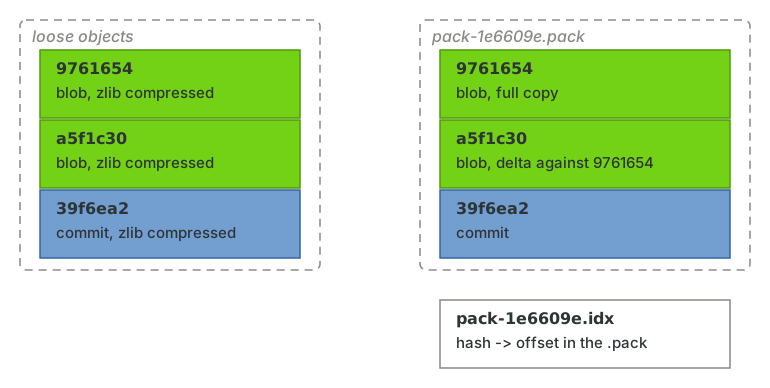
All fourteen loose objects are gone, and in their place are two packfiles. A .pack file contains many objects concatenated together, and its .idx companion is an index that maps each object's hash to its offset in the pack, so Git can find an object without reading the whole file. (The .rev file is the same mapping in the other direction.) git verify-pack lists what's inside.
$ git verify-pack -v .git/objects/pack/pack-60461f6*.idx6ad170702649192e8a22730df701c669446f3836 commit 253 175 12e243e33f1e78520994238acbbdc71c69fb552562 commit 264 178 187dc95ef877c70856e5558ca79648adf1ad3f9eea7 commit 254 175 365479a2f351b6d019a04fb0710cbc5c9d4f151f1b2 commit 199 135 540e69de29bb2d1d6434b8b29ae775ad8c2e48c5391 blob 0 9 675e59893378579d2ea4b0dad5358c98005b073029e blob 26 36 684700fe30fe76a4be3e6b1c14213187e6480c1d977 tree 69 77 7209722ffe2a79ad821e1322518bae35ed15a8e2545 tree 34 45 7971d3abae32fb44b950259fdac35261f28c8ce7c96 tree 34 44 8428ef262b9035459f3ef0d2a85300fce7f8e85ea28 blob 23 33 886543b9bebdc6bd5c4b22136034a95dd097a57d3dd tree 34 45 919non delta: 11 objects
The columns are the hash, type, uncompressed size, size in the pack, and offset. The interesting thing about packfiles is the thing this tiny repository is too small to show: deltas. When Git packs objects, it looks for objects that resemble each other (the last ten versions of the same file, say) and stores most of them as a small diff against another object in the pack. It's the only place in Git where anything is stored as a difference, and it's an implementation detail of the storage layer; every command above it still sees whole snapshots. This is how Git manages to store every version of every file and still be smaller than the checkout of a large project.
Packfiles are also what travels over the network. When you push or fetch, the sending side builds a packfile containing just the objects the other side is missing, which is why git push prints lines about "Compressing objects" and "Writing objects".
Unreachable objects
Why two packs? Look at the second one.
$ git verify-pack -v .git/objects/pack/pack-f569023*.idx0f6efe89236a7af4cb61b1cc071ae90dbc6b00d5 commit 244 163 12878ea3845b42e24ba83174422bbc5a47b2e1b610 tree 108 112 175e9c96da8580e3c77460dd65d16c4df766ab0840e blob 10 19 287non delta: 3 objects
That's the "Add a feature" commit we deleted the branch for in the previous chapter, along with its tree and blob. It's unreachable, but git gc didn't delete it. Instead it put it in a separate cruft pack, whose .mtimes file records when each object was last seen. The commit is still there.
$ git fsck --lost-founddangling commit 0f6efe89236a7af4cb61b1cc071ae90dbc6b00d5$ git cat-file -t 0f6efe8commit
Git only actually deletes an unreachable object once two things are true. It has to be older than gc.pruneExpire, which defaults to two weeks, so that an object created a moment ago by a command that's still running is never deleted out from under it. And it has to be unreachable from the reflog as well as from the refs, and reflog entries only expire after gc.reflogExpireUnreachable (30 days) or gc.reflogExpire (90 days). In other words, a commit you've made is safe for at least a month no matter how you lose it, and probably three.
We can force the issue, just to prove it's the reflog and the expiry keeping the commit alive.
$ git reflog expire --expire=now --all$ git gc --prune=now$ git fsck --lost-found$ git cat-file -t 0f6efe8fatal: Not a valid object name 0f6efe8
Now it's really gone. Please don't do this outside a demonstration; the reflog and the grace period are what make everything in the previous chapter work.
Maintenance
git gc does more than pack objects. It packs refs (which is where packed-refs comes from, as we saw in References), expires old reflog entries, and writes the commit-graph, a cache of commit metadata that lets git log and friends walk history without decompressing every commit object.
$ ls .git/objects/info/commit-graphpacks
On a large repository the automatic gc can take a noticeable pause at an inconvenient moment. git maintenance start registers the repository with your operating system's scheduler (launchd, systemd or the Windows task scheduler) so that these tasks run in the background on a schedule instead. If you work on anything with more than a few thousand commits, it's worth turning on and forgetting about.