
Worktrees
Here's a situation everybody has been in. You're halfway through a feature, with a dozen changed files, and somebody asks you to look at a bug on main. Your options are to commit half-finished work, stash it (see the next chapter), or clone the repository again somewhere else. None of these are great.
The problem is that a repository has one working tree, and the working tree can only be on one branch at a time. Or rather, that was the problem. Since Git 2.5, a repository can have any number of working trees, each checked out on a different branch, all sharing the same .git directory. These are called worktrees, and they take advantage of something we've known since Repositories: the working tree is just a checkout of a tree object, and the repository doesn't much care where (or whether) it exists.
$ git worktree list/home/demo/clone-of-bare-repo 17e34fd [main]
The repository we cloned in Remotes has one worktree, which is the directory we've been working in. Let's add another one for the hotfix, on a new branch.
$ git worktree add ../hotfix-worktree -b hotfixPreparing worktree (new branch 'hotfix')HEAD is now at 17e34fd Add more information to readme$ ls -la ../hotfix-worktreetotal 16drwxr-xr-x 4 demo demo 128 Sep 29 00:32 .drwxr-xr-x 22 demo demo 704 Sep 29 00:32 ..-rw-r--r-- 1 demo demo 200 Sep 29 00:32 .git-rw-r--r-- 1 demo demo 36 Sep 29 00:32 README
The new directory looks like a normal checkout, except that .git is a file rather than a directory.
$ cat ../hotfix-worktree/.gitgitdir: /home/demo/clone-of-bare-repo/.git/worktrees/hotfix-worktree
This is Git's mechanism for "the repository is over there". When Git finds a .git file instead of a directory, it reads the path from it and carries on. (Submodules use the same trick.) That path points to a small directory inside the main repository which holds the things that have to be different per worktree: its own HEAD, its own index, and its own reflogs.
$ ls .git/worktrees/hotfix-worktreeHEADORIG_HEADcommondirgitdirindexlogsrefs$ cat .git/worktrees/hotfix-worktree/HEADref: refs/heads/hotfix
Everything else (objects, branches, tags, remotes and configuration) is shared, because it lives in the main .git directory, which commondir points to.
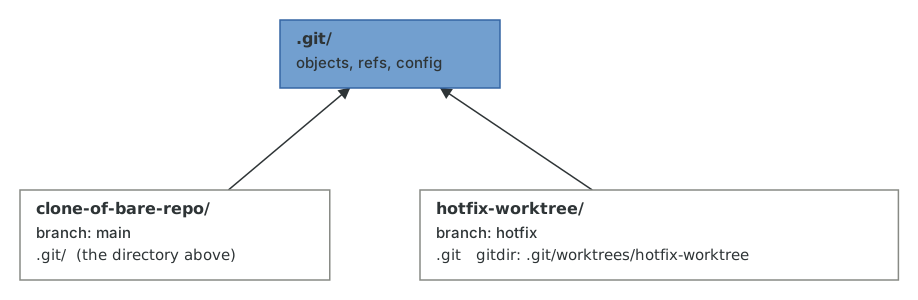
Committing in the new worktree works exactly as you'd expect, and the commit is immediately visible from the original one, because they're the same repository.
$ cd ../hotfix-worktree$ echo 'Fix the thing.' > FIX$ git add FIX$ git commit -m "Fix the thing"[hotfix 4de69d6] Fix the thing1 file changed, 1 insertion(+)create mode 100644 FIX$ cd ../clone-of-bare-repo$ git log --oneline hotfix4de69d6 Fix the thing17e34fd Add more information to readme9b446eb Add readme
There is one rule: a branch can only be checked out in one worktree at a time. If it weren't for this rule, committing in one worktree would silently move the branch out from under the other one.
$ git switch hotfixfatal: 'hotfix' is already used by worktree at '/home/demo/hotfix-worktree'
When you're done with a worktree, remove it. This deletes the directory and the bookkeeping under .git/worktrees; the branch and its commits stay.
$ git worktree remove ../hotfix-worktree$ git worktree list/home/demo/clone-of-bare-repo 17e34fd [main]
If you delete a worktree directory by hand instead, git worktree prune cleans up the leftover bookkeeping.
Worktrees have quietly become one of my most-used Git features. Reviewing a pull request in a second worktree means never having to stash or disturb the build in the first one, long-running tests can run on one branch while you work on another, and the whole thing is cheaper than a second clone because there's only one object store. The next chapter covers the tool people reached for before worktrees existed, and it's still worth understanding, because it's stranger than it looks.