
Pushing
We've just cloned a completely empty repository, and we want to start working on it.
$ echo 'Project v1.0' > README$ git add README$ git commit -m "Add readme"[main (root-commit) 9b446eb] Add readme1 file changed, 1 insertion(+)create mode 100644 README
Notice that even though it didn't technically exist (there was nothing in .git/refs/heads), this commit has been made to the main branch. That's because the HEAD of this repository pointed to main, so Git has gone ahead and created the branch for us.
$ cat .git/refs/heads/main9b446ebb6b83276777caa37a34446473283fa57a
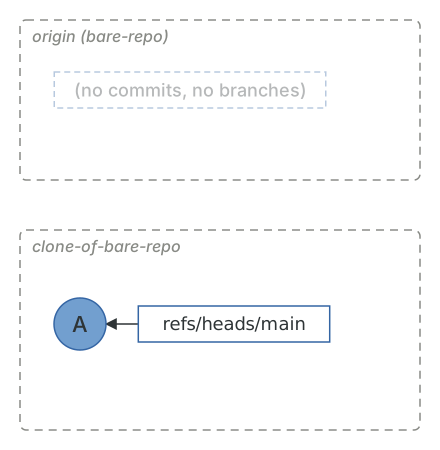
Now that we've completed some work, we need to share this with our collaborators who have also cloned this repository. Git makes this really easy.
$ git push origin mainTo /home/demo/bare-repo/* [new branch] main -> main
Let's take a look at the remote repository to see what happened.
$ cat ../bare-repo/refs/heads/main9b446ebb6b83276777caa37a34446473283fa57a$ git -C ../bare-repo show 9b446ebcommit 9b446ebb6b83276777caa37a34446473283fa57aAuthor: Joseph Wynn <[email protected]>Date: Fri May 29 09:24:40 2026 +1200Add readmediff --git a/README b/READMEnew file mode 100644index 0000000..5cecdfb--- /dev/null+++ b/README@@ -0,0 +1 @@+Project v1.0
As we expected, the remote repository now contains a main branch which points to the commit that we just created.
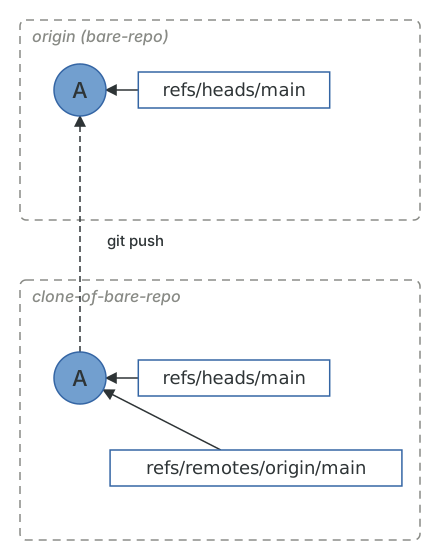
Essentially what happened when we ran git push, is Git updated the remote's references, and sent it any objects required to build those references. In this case, git push updated the remote's main to point at 9b446eb, and sent it the 9b446eb commit object as well as the tree and blob objects related to that commit. That's all a push is: a ref update on another machine, plus whatever objects that machine is missing. Git works out the "missing" part by having the two sides exchange the hashes they have, which is why a push only ever transfers the new commits.
The remote will refuse a push that isn't a fast-forward of the branch it already has, for exactly the reason a fast-forward merge is safe: if the remote's branch is an ancestor of what you're pushing, nothing is lost by moving the pointer. If it isn't, somebody else has pushed since you last fetched, and you need to integrate their work first (see Pulling).
What git push pushes
In the first edition of this guide I warned against running git push without arguments, because Git's default at the time was to push every branch that had a matching branch on the remote. That default (matching) was replaced by simple in Git 2.0, and running git push on its own is now safe: it pushes the current branch to its upstream branch, and refuses if it doesn't have one.
$ git switch -c feature-branchSwitched to a new branch 'feature-branch'$ git pushfatal: The current branch feature-branch has no upstream branch.To push the current branch and set the remote as upstream, usegit push --set-upstream origin feature-branchTo have this happen automatically for branches without a trackingupstream, see 'push.autoSetupRemote' in 'git help config'.
Git even tells you what to do. -u is short for --set-upstream.
$ git push -u origin feature-branchTo /home/demo/bare-repo/* [new branch] feature-branch -> feature-branchbranch 'feature-branch' set up to track 'origin/feature-branch'.$ cat .git/config[core]...[remote "origin"]url = /home/demo/bare-repo/fetch = +refs/heads/*:refs/remotes/origin/*[branch "main"]remote = originmerge = refs/heads/main[branch "feature-branch"]remote = originmerge = refs/heads/feature-branch$ git pushEverything up-to-date
Setting the upstream added a branch section to .git/config, just like the one git clone created for main, and from now on git push and git pull on this branch know where to go. If you're tired of typing -u every time you create a branch, push.autoSetupRemote = true does it for you.
Force pushing
Sometimes you need to push something that isn't a fast-forward. The usual reason is that you rebased or amended a branch you'd already pushed. git push --force will make the remote take whatever you have, and it is the most dangerous command in Git, because it will also happily throw away commits that somebody else pushed while you weren't looking.
--force-with-lease is the version you should use instead. It tells the remote "replace feature-branch, but only if it still points where I think it does", where "where I think it does" is your remote-tracking branch, origin/feature-branch. Let's see it save us. In the meantime, a colleague has pushed a commit to feature-branch that we haven't fetched yet, and we amend our commit.
$ git commit --amend -m "Add readme (amended)"[feature-branch ebfcb10] Add readme (amended)Date: Fri May 29 09:24:40 2026 +12001 file changed, 1 insertion(+)create mode 100644 README$ git push --force-with-lease origin feature-branchTo /home/demo/bare-repo/! [rejected] feature-branch -> feature-branch (stale info)error: failed to push some refs to '/home/demo/bare-repo/'
"Stale info" means the remote's feature-branch has moved since we last looked at it. A plain --force would have deleted our colleague's commit. Instead we can fetch, see what happened, and decide what to do.
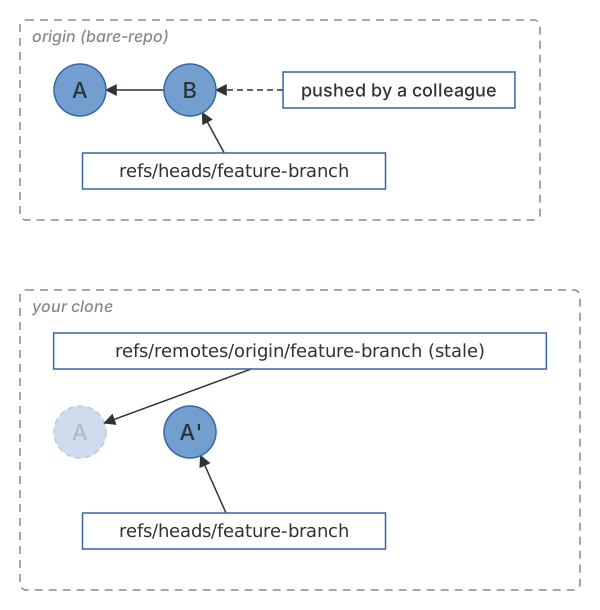
$ git fetch originFrom /home/demo/bare-repo9b446eb..7611250 feature-branch -> origin/feature-branch$ git log --oneline --allebfcb10 Add readme (amended)7611250 Update README from the second clone9b446eb Add readme
There is a subtlety here. Once you've fetched, origin/feature-branch matches the remote, and --force-with-lease will succeed even though you haven't actually looked at the new commit. --force-if-includes closes that gap by also checking that the remote's tip has been integrated into what you're pushing (that is, you've rebased on top of it). It only does anything alongside --force-with-lease, and setting push.useForceIfIncludes = true turns it on for every lease push. So in practice: use --force-with-lease, never bare --force, and let Git tell you when something has changed under you.
Now that we've put commits on the remote, let's look at the other direction.