
Repositories
At the core of Git, like other version control systems, is the repository. A Git repository is really just a simple key-value data store. This is where Git stores, among other things:
- Blobs, which are the most basic data type in Git. Essentially, a blob is just a bunch of bytes; usually the contents of a file.
- Tree objects, which are a bit like directories. Tree objects contain pointers to blobs and other tree objects.
- Commit objects, which point to a single tree object, and contain some metadata including the commit author and any parent commits.
- Tag objects, which point to a single commit object, and contain some metadata.
- References, which are pointers to a single object (usually a commit or tag object).
You don't need to worry about all of this just yet; we'll cover each of these things in detail in the following chapters.
The important thing to remember about a Git repository is that it exists entirely in a single .git directory in your project root. There is no central repository. GitHub is not the repository; GitHub has a copy of the repository, and so does every one of your collaborators. This is what makes Git a distributed version control system: everybody has their own self-contained repository, and it is complete enough that if GitHub disappeared tomorrow, nothing would be lost.
You can initialise a Git repository anywhere with the git init command. Take a look inside the .git directory to get a glimpse of what a repository looks like.
$ git initInitialized empty Git repository in /home/demo/demo-repository/.git/$ ls -l .gittotal 24-rw-r--r-- 1 demo demo 21 Sep 29 00:23 HEAD-rw-r--r-- 1 demo demo 137 Sep 29 00:23 config-rw-r--r-- 1 demo demo 73 Sep 29 00:23 descriptiondrwxr-xr-x 16 demo demo 512 Sep 29 00:23 hooksdrwxr-xr-x 3 demo demo 96 Sep 29 00:23 infodrwxr-xr-x 4 demo demo 128 Sep 29 00:23 objectsdrwxr-xr-x 4 demo demo 128 Sep 29 00:23 refs
The important directories are .git/objects, where Git stores all of its objects; and .git/refs, where Git stores all of its references. Both are empty right now. Everything else is a nice-to-have: hooks contains sample scripts, description is only used by some web front-ends, and info holds a per-repository ignore file.
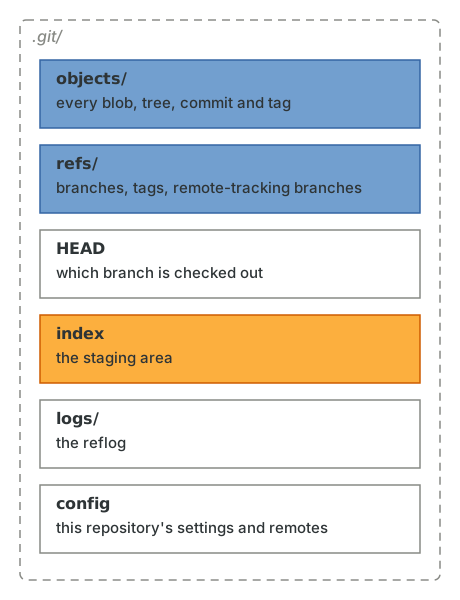
A few of these (index and logs) don't exist yet, because nothing has been staged and nothing has moved. We'll meet each of them in turn.
The two files worth looking at are HEAD and config.
$ cat .git/HEADref: refs/heads/main$ cat .git/config[core]repositoryformatversion = 0filemode = truebare = falselogallrefupdates = trueignorecase = trueprecomposeunicode = true
HEAD tells Git which branch you're on. Notice that it refers to a branch called main which doesn't exist yet: there is nothing in .git/refs/heads. Git is perfectly happy with this. As we'll see in References, HEAD is just a pointer, and the branch will be created the moment you make your first commit.
Whether that branch is called main or master depends on the init.defaultBranch setting. Git itself still defaults to master (and prints a hint suggesting you change it), but main has been the convention on GitHub and most other hosts since 2020, and it's what this guide uses. If you'd like the same, run this once:
$ git config set --global init.defaultBranch main
Everything else in config is repository-level configuration. The values you see here depend on your operating system (ignorecase and precomposeunicode are Git noticing that this repository lives on a macOS file system). Repository configuration is layered on top of your global configuration in ~/.gitconfig, which is layered on top of the system configuration, and you can see the whole stack with git config list --show-origin.
Notice that the whole repository is, right now, four small text files:
$ find .git -type f -not -path "*/hooks/*".git/config.git/HEAD.git/info/exclude.git/description
That is about to change. We'll see how all of this fits together as we learn about the rest of Git. For now, let's learn about the thing that goes in .git/objects.