
Stashing
git stash takes all changes to your working tree and index, and "stashes" them away, giving you a clean working tree. You can then retrieve those changes from your stash and re-apply them to the working tree at any time with git stash pop. A common use for the stash command is to save some half-finished changes in order to switch to another branch.
This seems fairly simple at first, but the mechanism behind the stash command is actually quite interesting, and it's a good test of everything we've covered so far. Let's build a simple repository to see how it works.
$ echo 'Foo' > test.txt$ git add test.txt$ git commit -m "Initial commit"[main (root-commit) 85b482e] Initial commit1 file changed, 1 insertion(+)create mode 100644 test.txt
Now let's make some changes, and stash them.
$ echo 'Bar' >> test.txt$ git stashSaved working directory and index state WIP on main: 85b482e Initial commit$ cat test.txtFoo
Stashes in Git are put onto a stack, with the most recently-stashed on top. You can list all current stashes with git stash list.
$ git stash liststash@{0}: WIP on main: 85b482e Initial commit
Right now we only have one stash: stash@{0}. That @{0} syntax should look familiar from References: it's a reflog lookup. So a stash is a reference, and we can inspect it.
$ git show --format=raw -s stash@{0}commit 41f92d778f7cd822f2117d6f1511ed8e6dee056dtree 438c5dce7a1d2a39b269f602f393e0457f670031parent 85b482e3b52706deb426ce4961ca9d0cb2fe8d0fparent e9dca65a48ea938e778c33e80bdc8ce60f58a36bauthor Joseph Wynn <[email protected]> 1780003960 +1200committer Joseph Wynn <[email protected]> 1780003960 +1200WIP on main: 85b482e Initial commit
From this we can see that the stash is pointing to a commit object. What's interesting is that the stash commit is a merge commit. We'll look into that in a bit, but first: where is this commit?
$ git log --oneline85b482e Initial commit$ git branch* main$ git fsck --lost-found
It's not in the current branch, and there are no other branches it could be in. git fsck hasn't found any dangling commits, so it must be referenced somewhere. But where?
The answer is simple: Git creates a special reference for the stash which isn't seen by commands like git branch and git tag. This reference lives in .git/refs/stash. We can verify this with git show-ref.
$ git show-ref85b482e3b52706deb426ce4961ca9d0cb2fe8d0f refs/heads/main41f92d778f7cd822f2117d6f1511ed8e6dee056d refs/stash$ cat .git/refs/stash41f92d778f7cd822f2117d6f1511ed8e6dee056d
So why does Git create a merge commit for a stash? The answer is relatively simple: as well as recording the state of the working tree, git stash also records the state of the index. Since it's possible for the index and the working tree to contain changes to the same file, Git needs to store the states separately. And it just so happens that a commit already has a slot for "another tree I'm related to": the second parent.
$ git show --format=raw -s 'stash@{0}^2'commit e9dca65a48ea938e778c33e80bdc8ce60f58a36btree 12a7243fec772e2c3ee8963a5bbf5e5dfa1da6a6parent 85b482e3b52706deb426ce4961ca9d0cb2fe8d0fauthor Joseph Wynn <[email protected]> 1780003960 +1200committer Joseph Wynn <[email protected]> 1780003960 +1200index on main: 85b482e Initial commit
This gives us a history that looks a little like this:
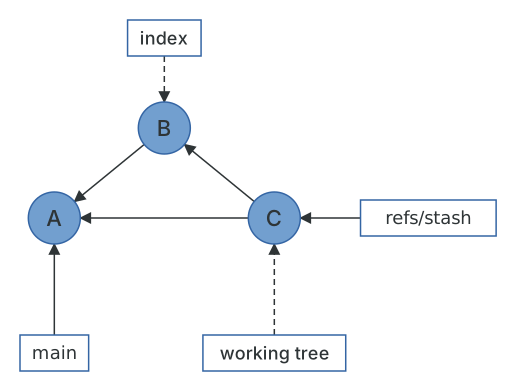
In this history graph, the tree of commit C contains the working tree. Commit C's first parent is the commit that HEAD pointed to when the stash was created (commit A). The second parent (commit B) contains the index. It is with these two commits that Git is able to re-apply your stashed changes. Using the revision syntax from References, we can look inside each of them.
$ git show 'stash@{0}^2:test.txt'Foo$ git show 'stash@{0}:test.txt'FooBar
Our change to test.txt was never added to the index, so the index commit has the original file and the working tree commit has the modified one. Exactly what we'd expect.
Untracked files
By default, a stash only includes tracked files. --include-untracked (or -u) stashes new files as well, and Git stores them in the only place left: a third parent.
$ echo 'Bar' >> test.txt$ echo 'Untracked' > untracked.txt$ git stash push --include-untrackedSaved working directory and index state WIP on main: 85b482e Initial commit$ git show --format=raw -s 'stash@{0}'commit 3189c6409b33d8a106834eab2482d2d192b981bftree 438c5dce7a1d2a39b269f602f393e0457f670031parent 85b482e3b52706deb426ce4961ca9d0cb2fe8d0fparent 206388587443285da8bfb38068862ed7dd05e3ffparent adc822c402a531107885e37f0fb545c4c815d03aauthor Joseph Wynn <[email protected]> 1780004020 +1200committer Joseph Wynn <[email protected]> 1780004020 +1200WIP on main: 85b482e Initial commit$ git ls-tree 'stash@{0}^3'100644 blob b797b455c19dd77b11f12500eedbba870abe88e3 untracked.txt
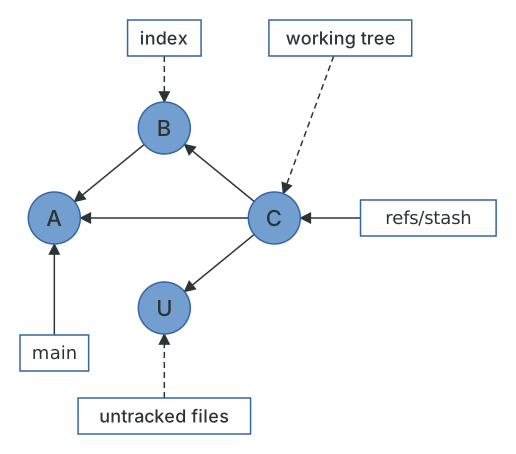
The third parent has no parents of its own and its tree contains only the untracked files. Git commits can have any number of parents (a merge of more than two branches is called an octopus merge), and stash just borrows the feature.
The stash stack
We said stashes are a stack, and now we can see how. refs/stash only ever points at the most recent stash. The older ones are found through the reflog of refs/stash, which is why they're named stash@{1}, stash@{2} and so on.
$ git stash liststash@{0}: WIP on main: 85b482e Initial commitstash@{1}: WIP on main: 85b482e Initial commit$ git reflog stash3189c64 stash@{0}: WIP on main: 85b482e Initial commit41f92d7 stash@{1}: WIP on main: 85b482e Initial commit
git stash pop applies the top stash and then drops it, which means removing that entry from the reflog. Since the stash is a commit, "applying" it is a three-way merge between the stash commit and your current HEAD, with the stash's first parent as the base. It can conflict like any other merge, and if it does, Git leaves the stash in place so you don't lose it.
$ git stash popOn branch mainChanges not staged for commit:(use "git add <file>..." to update what will be committed)(use "git restore <file>..." to discard changes in working directory)modified: test.txtUntracked files:(use "git add <file>..." to include in what will be committed)untracked.txtno changes added to commit (use "git add" and/or "git commit -a")Dropped refs/stash@{0} (3189c6409b33d8a106834eab2482d2d192b981bf)$ git stash liststash@{0}: WIP on main: 85b482e Initial commit
Notice that Git printed the hash of the dropped stash. A dropped stash is a commit that nothing points to anymore, and git stash apply 3189c64 will bring it back for as long as the object survives. A stash is just commits, and commits are hard to lose, which is the subject of the next chapter.