
Tags
There are two types of tags in Git: lightweight tags and annotated tags.
On the surface, these two types of tags look very similar. Both of them are references stored in .git/refs/tags. However, that's about as far as the similarities go. Let's create a lightweight tag to see how they work.
$ git tag 1.0-lightweight$ cat .git/refs/tags/1.0-lightweight39f6ea2439eb1fd9f7837a223866f243b70125c0
We can see that Git has created a tag reference which points to the current commit. By default, git tag will create a lightweight tag. Note that this is not a tag object. We can verify this by using git cat-file to inspect the tag.
$ git cat-file -t 1.0-lightweightcommit$ git cat-file -p 1.0-lightweighttree 9d073fcdfaf07a39631ef94bcb3b8268bc2106b1author Joseph Wynn <[email protected]> 1780000060 +1200committer Joseph Wynn <[email protected]> 1780000060 +1200First commit$ git cat-file -p 39f6ea2tree 9d073fcdfaf07a39631ef94bcb3b8268bc2106b1author Joseph Wynn <[email protected]> 1780000060 +1200committer Joseph Wynn <[email protected]> 1780000060 +1200First commit
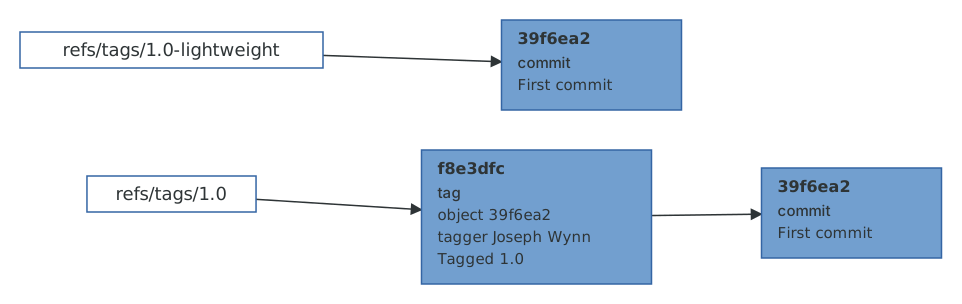
You can see that as far as Git is concerned, the 1.0-lightweight tag and the 39f6ea2 commit are the same object. That's because the lightweight tag is only a reference to the commit object. Functionally it's a branch that never moves.
Let's compare this to an annotated tag.
$ git tag -a -m "Tagged 1.0" 1.0$ cat .git/refs/tags/1.0f8e3dfc854bb128b0521cd0c7093919393d3ecf9
We've passed the -a (--annotate) flag to git tag to create an annotated tag. Notice how Git creates a reference for the tag just like the lightweight tag, but this reference is not pointing to the same object as the lightweight tag. Let's use git cat-file again to inspect the object.
$ git cat-file -t 1.0tag$ git cat-file -p 1.0object 39f6ea2439eb1fd9f7837a223866f243b70125c0type committag 1.0tagger Joseph Wynn <[email protected]> 1780000540 +1200Tagged 1.0
This is a tag object, separate to the commit that it points to. As well as containing a pointer to a commit, tag objects also store a tag message and information about the tagger. It's the fourth and final kind of object in Git's store.
When you give a tag object to a command that expects a commit, Git quietly follows the object pointer for you. The revision syntax ^{commit} makes this explicit, and it's the difference between "the tag" and "what the tag points at".
$ git rev-parse 1.0 '1.0^{commit}'f8e3dfc854bb128b0521cd0c7093919393d3ecf939f6ea2439eb1fd9f7837a223866f243b70125c0
There are a few reasons why annotated tags are preferred over lightweight tags. Probably the most important reason is that annotated tags have their own author information. This can be helpful when you want to know who created the tag, rather than who created the commit that the tag is referring to. Annotated tags are also timestamped. Since new versions are usually tagged right before they are released, an annotated tag can tell you when a version was released rather than just when the final commit was made. And annotated tags can be signed.
Signed tags
A signature lets someone verify that a tag was created by you, rather than by someone with write access to a repository that has a copy of your tags. For a long time this meant setting up GPG, which was enough of a chore that most people never did. Since Git 2.34, Git can sign with the SSH key you almost certainly already have.
$ git config set --global gpg.format ssh$ git config set --global user.signingKey ~/.ssh/id_ed25519.pub$ git tag -s -m "Tagged 1.1" 1.1$ git cat-file -p 1.1object 39f6ea2439eb1fd9f7837a223866f243b70125c0type committag 1.1tagger Joseph Wynn <[email protected]> 1780000600 +1200Tagged 1.1-----BEGIN SSH SIGNATURE-----U1NIU0lHAAAAAQAAADMAAAALc3NoLWVkMjU1MTkAAAAgU/JIWCJhTZXq3VENTxrxH1I0T0HE+fJdnGwIXywgyQwAAAADZ2l0AAAAAAAAAAZzaGE1MTIAAABTAAAAC3NzaC1lZDI1NTE5AAAAQCfvg9ZEsacLGSBnlnztd6tJmV7kZbg+owzp/N73f3uJ+79gMPVXBvN3I/9eUFX3eccirF62sEVANJggc13XXQQ=-----END SSH SIGNATURE-----
The signature is stored inside the tag object, as part of its content. To verify a signature, Git needs to know which keys to trust, which for SSH means an allowed signers file that maps email addresses to public keys.
$ echo "[email protected] $(cat ~/.ssh/id_ed25519.pub)" \> ~/.allowed-signers$ git config set --global gpg.ssh.allowedSignersFile ~/.allowed-signers$ git verify-tag 1.1Good "git" signature for [email protected] with ED25519 key SHA256:cOO/ouNEBl+7gQGOfKI05YEgqWtYwI0gPvbCec+kL80
Commits can be signed in exactly the same way (git commit -S, or commit.gpgSign = true to do it always), and hosting providers will show a "verified" badge next to signed commits and tags if you upload the same public key to your account. Signing is one of those things that is worth setting up once and then forgetting about.
Listing tags
git tag on its own lists your tags, and -n includes the first line of the tag message (or, for a lightweight tag, the first line of the commit message, since there's no tag message to show).
$ git tag1.01.0-lightweight1.1$ git tag -n1.0 Tagged 1.01.0-lightweight First commit1.1 Tagged 1.1
One last thing about tags: they aren't pushed by default. git push sends branches, and you either push a tag explicitly (git push origin 1.1), push all of them (git push --tags), or, my preference, use git push --follow-tags to push annotated tags that point at commits you're pushing anyway. Setting push.followTags = true makes that the default.
We now know about all four kinds of object and both kinds of reference. It's time to see what happens when two branches meet.